[Main](Main.md.html) - [Projects](Projects.md.html) - [Tutorials](Tutorials.md.html) - [Development](Development.md.html) - [ArtTools](ArtTools.md.html) - [Estrela](Estrela.Estrela.md.html) - [Legal](Legal.md.html)
# Development
**Active development of the engine has ceased.**
This section adresses readers who want to create games on their own. Creating games in Luxinia is not difficult at all, in fact, if you know how to create folders and simple files, you are ready to start. Moreover, you will need to learn programming. But it's no big deal to do that - lua is an extremly simple language and the basics can be learnt fast. Just don't start at the tip of the iceberg, but grow with your projects.
The [Tutorials/Tutorials](Tutorials.md.html) will give you a quite simple introduction how to use Luxinia and Lua.
## Requirements
* Luxinia
* [Estrela Editor](Estrela.Estrela.md.html), our free wxLua based editor serving as Luxinia IDE, code completion, api tooltips... Or any other texteditor ([e.g CrimsonEditor](http://www.crimsoneditor.com/), Notepad..)
* The will to learn
* red
* [Toolkit](Main.Download.md.html) (for model exporters/conversion)
## What Projects can be made with Luxinia?
* Horizontal and vertical scrollers of any type
* Racing games
* Jumpnruns
* 1st/3rd person outdoor games
* other 3D visualisation (non-game)
* tools for your games
Egoshooters within buildings and complex city structures are not Luxinia's strength since it currently lacks a BSP / portal rendering system for detailed level architecture. This might come in a future version.
## Documentation
* [Luxinia Api](http://www.luxinia.de/doc/frames)
* [Api/Shader](https://github.com/pixeljetstream/luxinia1/blob/master/engine/source/luxinia_shdscript.md)
* [Api/Material](https://github.com/pixeljetstream/luxinia1/blob/master/engine/source/luxinia_mtlscript.md)
* [Api/Particle](https://github.com/pixeljetstream/luxinia1/blob/master/engine/source/luxinia_prtscript.md)
## Architecture
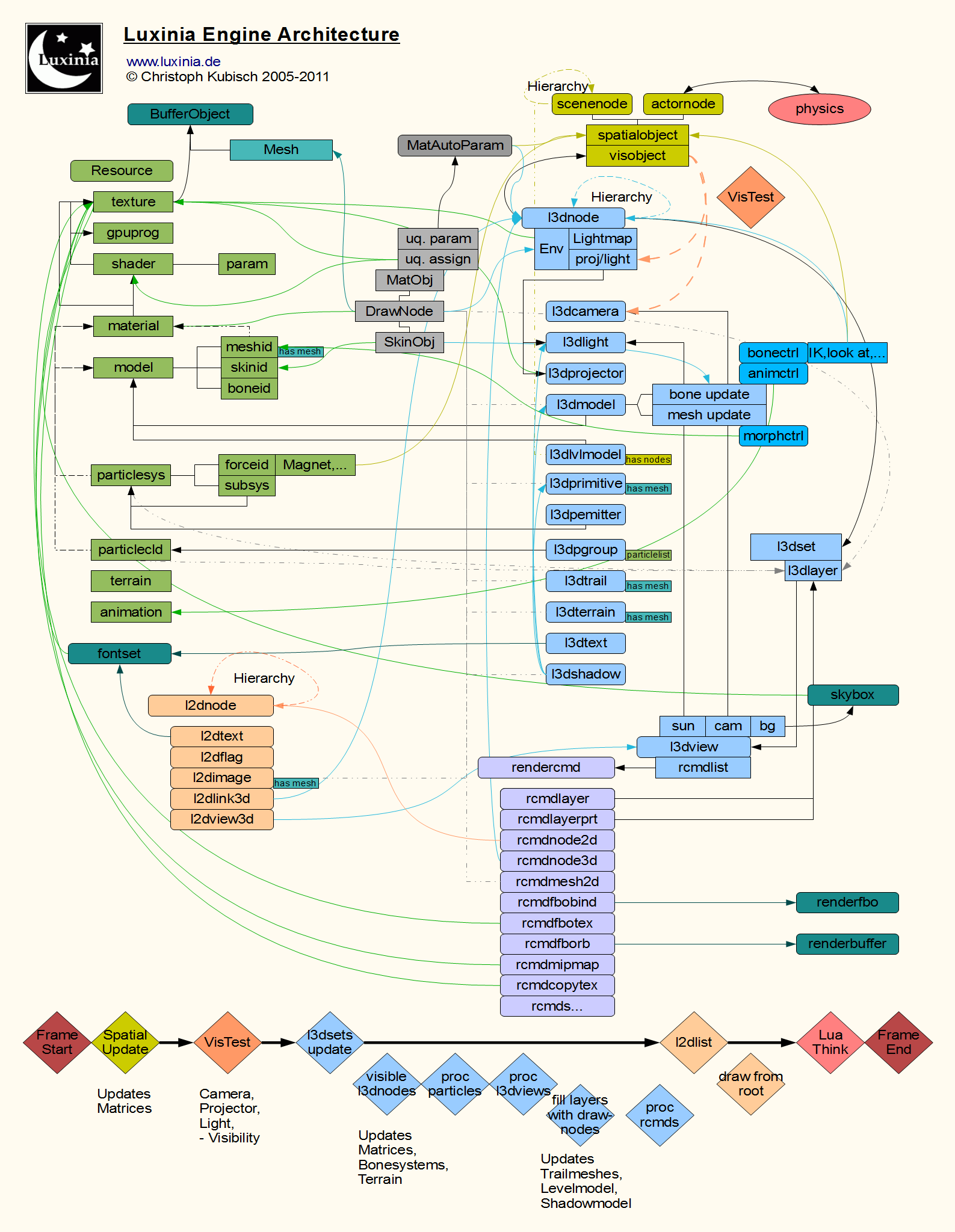
This is a basic overview on the execution flow and rendering architecture design.
* Spatial Updates
* ActorList
* Automatic positions
* Matrix update
* SceneTree
* Recompile Tree if needed
* Matrix update
* Render
* List3D update props
* Cameras
* Lights
* Projectors
* VisTest
* Add nodes to OcTrees
* Visibility testing
* Projectors testing
* Lights minimum range finding
* List3D Update & draw
* Draw sets
* Update visible nodes
* Matrix update
* Animation update
* Lights querying
* Projectors querying
* Draw views
* Prepare view
* setup viewport (bounding rectangle)
* Camera
* Sun
* Fill draw layers
* Shadowmodel update
* Trail mesh update
* levelmodel update
* Process render commands (rcmd)
* List2D update & draw
* Recursively for each node
* Sort children
* Draw children
* Draw stats
* Console Draw
* SoundList
* Update soundnodes
* Play soundnodes
* Lua Think
* process think-functions in lua scripts
The engine is basically split in a few main parts, which communicate with each other. The user only has partial access thru scripting, and does not have to worry about what is done internally. However here is a short description about the key elements in the engine
## Lua Think
Once a lua script was loaded, the execution of the engine is continued. However, every frame a lua function is called. You can register functions to be called every frame by using the Timer class.
## Function Publishing
Many of the lua calls will end up here, in the engine's own system to work on user variables and class methods. The system publishes all classes that can be accessed from Lua along with the methods that are allowed. See LuaDoc for details.
## Resource Manager
The user can load models, textures... The resource manager can be split into various memory chunks, if the user wants to, but normally there is one big MemoryPool where all user resources go to, and will reside until the end. One cannot unload resources individually, only complete chunks, if chunk management is used. Resources can only be loaded once, and will be referenced to, if loaded again. They are first looked after in the projectpath, then if not found in the basepath.
## Render
The Renderer performs 3 main tasks, and comes before anything else.
* Setting up the proper environment (background,lights, cameras,...)
* Visibility Testing
* Rendering the List3D and then the List2D
It is organised as
* List3D
* separated into sets, and layers
* every layer can hold models, trails..
* nodes are linked to other l3dnodes or worldnodes, only worldnodes do visibility testing. If a worldnode wasnt visible, children l3dnodes wont be seen either.
* sets contain background information, camera,sun.. and particles
* generally used for all perspective drawing
* List2D
* sorted by a user sortkey
* orthogonally drawn on top of the screen, after perspective drawing
* VisTest
* visibility testing is done based on the worldnodes
* finds nodes visible to cameras,projectors
* finds closest fxlights
## World
The world is separated into dynamic nodes and static nodes.
* SceneTree
* a hierarchical tree of scenenodes.
* scenenodes are normally static, although they can be moved and rotated just as the actors, it is most efficient to not change them after creation
* ActorList
* a simple list of actornodes
* actornodes have no hierarchy, but are meant for nodes that frequently change their position.
* actornodes allow automatic velocity handling
# Post-Mortem
**What was good:**
- very flexible and complete set of features to allow easy rapid prototyping. Tons of features that made a lot of game and research projects possible over the years!
- it's tiny, compiles fast and offers a lot bang for the buck :)
- fnpublish forcing us to document the public api, was also a great choice.
- The rcmd system and layering worked very well to allow a scriptable rendering loop (postfx etc.), also splitting visual stuff (l3d subsystem) from rest. The overall structure of the architecture and internal modules worked somewhat fine.
**What was bad:**
- fnpublish became home of implementations, instead of just forwarding to C functions!
- This is the biggest problem of the engine, and made it hard to get a real complete C api, or automatic wrappers for other bindings.
- main loop not in user's hand (although a manual mode exists).
- Related the two above, the fact that luxinia is not just a regular module that you can "require" into your lua app.
- renderer originally designed for "texture combiners" fixed function stuff, retro fitting to modern rendering features / custom shaders didnt work so well.
- It's okay for single use cases (post-process...) but not for a full blown shader material system. Would not use Cg runtime anymore, just for compilation and manage shaders manually.
- renderer redundancy checks way to fine-grained, instead should have used immutable "rsSurface" objects to group important states.
- "vid" grew out of control and got messy over time
- wanted even more renderer low level access, "rcmd" system was great but sometimes not enough. Doing more with Lua would have meant better low level access system (see luxinia2's luxgfx)
- should have used devil image lib ;) also should have never invested into more than a obj converter all the additional work for other formats didn't pay off. Today would use "assimp"
- lua gui is single window, single event only. Cannot do "render-to-texture" UIs that are on 3d objects.
**Current State**
- Actually the good overweights the bad by far, despite the tiny text ;)
- In it's current state, the engine compiles and should survive a test-run, but version 1400 source code was different. The main changes were ripping out "standalone" code to make the backend libraries, which became basis for the abandonded luxinia2. This means that the backend libs actually were run live inside luxinia1, but it also means that during refactoring some things might have broken.
# Tools
Most can be retrieved from the [Main/Download](Main.Download.md.html) site.
* [Tools/ResourceViewer](Tools.ResourceViewer.md.html) (built-in)
* [Tools/LuxF3D](Tools.LuxF3D.md.html) supports conversion of fileformats
* [Tools/3DSMaxExport](Tools.3DSMaxExport.md.html)
* [Tools/Cinema4DExport](Tools.Cinema4DExport.md.html)
* [Tools/BitFontGen](Tools.BitFontGen.md.html) generate font data
* [Syntax Files](http://www.luxinia.de/download/luxina_mtlshdprt_cg_crimsoneditor.zip) for [Crimson Editor](http://www.crimsoneditor.com/)
* [Estrela/Estrela](Estrela.Estrela.md.html), our wxLua based editor serving as Luxinia IDE, code completion, api tooltips... (open-source/free)
* [Tools/WorldEditor](Tools.WorldEditor.md.html) (currently on hold)
# User Guide
The [UserGuide](UserGuide.UserGuide.md.html) preceded the [Tutorials](Tutorials.Tutorials.md.html) but may still be useful to browse some code.
# Development Log
the [DevelopmentLog](DevelopmentLog.DevelopmentLog.md.html) tracks the progress of the engine (new features and fixes).