[Main](Main.md.html) - [Projects](Projects.md.html) - [Tutorials](Tutorials.md.html) - [Development](Development.md.html) - [ArtTools](ArtTools.md.html) - [Estrela](Estrela.Estrela.md.html) - [Legal](Legal.md.html)
# Using stencil shadows
[ ](https://www.youtube.com/watch?v=fJYXRTp0GFo)
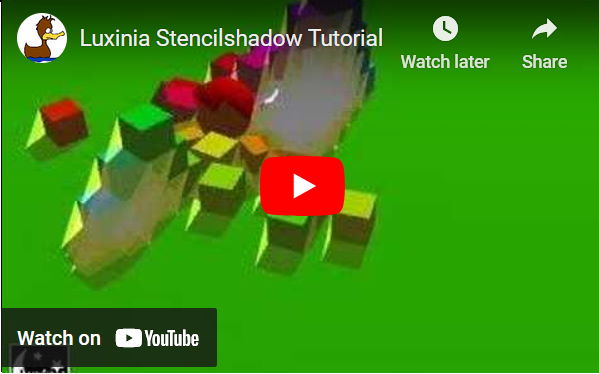
Stencil shadows provide a simple way to let objects cast a shadow. The shadows have a sharp edge and stencil shadows are more and more replaced by shadow maps for several reasons. However stencil shadows are easy to use and can be quickly applied to nontransparent and closed geometry.
## Theory
A wikipedia article [explains the technique as well](http://en.wikipedia.org/wiki/Shadow_volume), so this will cover only the basics.
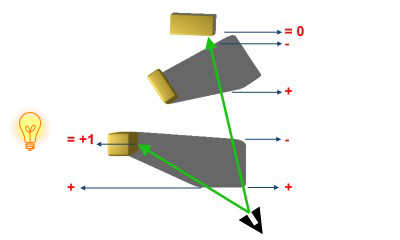
Stencil shadows are using the stencil and depth buffer. In a first step, the shadow volume of each shadow casting object is generated. This is done by finding the silhouette of the object seen from the light source. Our current implementation works only with closed geometry. The volume is rendered in such a fashion to the stencil buffer that all values, which do not have the original stencil value, mark pixels as "inside" the volume. For the algorithm to work, you need to have all occluding volumes written to depth buffer before rendering the shadow volume.
## Creating the volume
Luxinia provides a special l3dnode called `l3dshadowmodel`, which creates a volume mesh of a given l3dprimitive or l3dmodel, for a given l3dlight. The silhouette is detected and extruded with a given length or to infinity. If you know your scene is limited in its extends, you should also limit extrusion length, as it can improve performance.
For the tutorial we create a helper function that adds shadow to an object
``` lua
function addshadow(sun,hostl3d,alwaysvisible)
-- create the models in the second to last layer
-- it is important that shadowmodels are drawn
-- after regular geometry.
local shadow = l3dshadowmodel.new("shadow",
l3dset.get(0):layer(l3dlist.l3dlayercount()-2),sun,hostl3d)
-- shadow might be nil, in case the hostl3d was not a closed
-- mesh
if (not shadow) then return end
-- and we link the model to the host
shadow:parent(hostl3d)
-- Be aware now that the shadowmodel is now only rendered when
-- the host is visible. Which might not be correct in cases
-- where the shadow volume is very long.
-- Therefore we can make sure the shadowmesh is alwas rendered
-- with enabling "novistest".
shadow:novistest(alwaysvisible)
hostl3d.l3dshadow = l3dshadow
end
```
In the scene setup, where the boxes and spheres are created, we simply call the function for each object
``` lua
-- create sun first
sun = actornode.new("sun",-20,-10,25)
sun.l3d = l3dlight.new("sun")
sun.l3d:linkinterface(sun)
sun.l3d:makesun()
...
-- a function for creating the objects
local function makebody(p)
local ac = actornode.new("obj")
...
ac.l3d = l3dprimitive.newbox("box",p.w,p.h,p.d)
...
-- now lets add shadowmodel to the l3dprimitive
-- in our sample it's mostly okay to not set the
-- always visible flag
addshadow(sun.l3d,ac.l3d)
...
end
```
## Stencil Setup and Rendercommands
By default luxinia window will have a 8-Bit stencilbuffer. That means integers from 0-255 can be stored. So no additional queries need to be done. Like before we setup the l3dview
``` lua
view = UtilFunctions.simplerenderqueue()
view.rClear:stencilvalue(127)
```
We set the clear value to 127, because with the + and - operation depending on entering or leaving the shadows, the value can fluctuate. On hardware that does not support wrapped add/subtract, starting at 0 can create errors.
The **simplerenderqueue** sets up a **rcmds** of the following order and also stores them as table indices:
* **rClear**: `rcmdclear` that clears depth, color and stencil values
* **rDrawbg**: `rcmddrawbg` in which can render more complex backbrounds such as background meshes skyboxes, images...
* **rLayers**: a table that contains l3dlist.l3dlayercount() (currently 16) many subtables, which are made of:
* **stencil**: `rcmdstencil` implements the `stencilcommand` interface, with which you can set stencil environment to be used by the rendering operations afterwards.
* **drawlayer**: `rcmddrawlayer` renders the l3dlayerid for meshes. By default meshes are sorted for efficient rendering, ie same state/material setups.
* **drawprt**: `rcmddrawprt` renders the corresponding particle layer. By default particle systems are rendered in the last l3dlayerid.
Now after our meshes and shadowvolumes were rendered (we assume no mesh is part of the last l3dlayerid) we want to make the shadowed areas visible. Shadowed pixels now have a stencilvalue != 127. Therefore we set the rcmdstencil of the last layer to make sure that stenciltest is only passed by pixels which are in the shadow. Those pixels will be darkened by a fullscreen blend.
So first setup rcmdstencil:
``` lua
-- we use the stencilsetup for the layer that already exists in the
-- renderqueue
local ffxstencil = view.rLayers[l3dlist.l3dlayercount()].stencil
ffxstencil:scEnabled(true)
-- The l3dshadowmodel works in a fashion that any region in the
-- shadow will have a value that is not equal to the original
-- value (127). So we setup stenciltest to draw only in the
-- shadowed areas
ffxstencil:scFunction(comparemode.notequal(),comparemode.notequal(),
127,255)
-- we dont actually want to change stencil values, while drawing
-- so set everythin to keep
ffxstencil:scOperation(0,operationmode.keep(),
operationmode.keep(),operationmode.keep())
```
And finally the fullscreen quad:
``` lua
local fullscrn = rcmddraw2dmesh.new()
-- autosize -1 means its l3dview sized, which is also the default
-- 0 means custom position/size for the quad has to be defined.
fullscrn:autosize(-1)
-- enable stenciltest, so we only draw in shadow pixels
fullscrn:rfStenciltest(true)
-- we want to darken the areas in the shadow
-- so we set blendmode to modulate
fullscrn:rfBlend(true)
fullscrn:rsBlendmode(blendmode.modulate())
-- we set the color to slightly less than white
-- blendmode.modulate will do viewpixel * quad's colorpixel
-- so 0.8 will mean 80% of original brightness inside the shadow
fullscrn:color(0.4,0.4,0.4,1)
-- and finally we add it after the stencil command
-- into the view's renderqueue
-- if we would not have passed ffxstencil, the quad would be drawn
-- at the end of the queue, however want to keep the possibility to
-- render stuff unshadowed
view:rcmdadd(fullscrn,ffxstencil)
-- we can use "local" for fullscrn here, because
-- rcmdadd prevents garbage collection of any active rendercommands
```
## Possible issues
The source meshes for the shadows must be closed geometry and should not contain too many triangles. Silhouette extraction and volume extrusion are heavy operations, hence the source meshes should not be too complex. The use of stencil shadows in modern games with lots of geometry is fading because of this performance issue. But for less complex scenes you get pixel accurate shadows.
You can make volumes visible with `render.drawshadowvolumes(true)`.
](https://www.youtube.com/watch?v=fJYXRTp0GFo)
Stencil shadows provide a simple way to let objects cast a shadow. The shadows have a sharp edge and stencil shadows are more and more replaced by shadow maps for several reasons. However stencil shadows are easy to use and can be quickly applied to nontransparent and closed geometry.
## Theory
A wikipedia article [explains the technique as well](http://en.wikipedia.org/wiki/Shadow_volume), so this will cover only the basics.
Stencil shadows are using the stencil and depth buffer. In a first step, the shadow volume of each shadow casting object is generated. This is done by finding the silhouette of the object seen from the light source. Our current implementation works only with closed geometry. The volume is rendered in such a fashion to the stencil buffer that all values, which do not have the original stencil value, mark pixels as "inside" the volume. For the algorithm to work, you need to have all occluding volumes written to depth buffer before rendering the shadow volume.

## Creating the volume
Luxinia provides a special l3dnode called `l3dshadowmodel`, which creates a volume mesh of a given l3dprimitive or l3dmodel, for a given l3dlight. The silhouette is detected and extruded with a given length or to infinity. If you know your scene is limited in its extends, you should also limit extrusion length, as it can improve performance.
For the tutorial we create a helper function that adds shadow to an object
``` lua
function addshadow(sun,hostl3d,alwaysvisible)
-- create the models in the second to last layer
-- it is important that shadowmodels are drawn
-- after regular geometry.
local shadow = l3dshadowmodel.new("shadow",
l3dset.get(0):layer(l3dlist.l3dlayercount()-2),sun,hostl3d)
-- shadow might be nil, in case the hostl3d was not a closed
-- mesh
if (not shadow) then return end
-- and we link the model to the host
shadow:parent(hostl3d)
-- Be aware now that the shadowmodel is now only rendered when
-- the host is visible. Which might not be correct in cases
-- where the shadow volume is very long.
-- Therefore we can make sure the shadowmesh is alwas rendered
-- with enabling "novistest".
shadow:novistest(alwaysvisible)
hostl3d.l3dshadow = l3dshadow
end
```
In the scene setup, where the boxes and spheres are created, we simply call the function for each object
``` lua
-- create sun first
sun = actornode.new("sun",-20,-10,25)
sun.l3d = l3dlight.new("sun")
sun.l3d:linkinterface(sun)
sun.l3d:makesun()
...
-- a function for creating the objects
local function makebody(p)
local ac = actornode.new("obj")
...
ac.l3d = l3dprimitive.newbox("box",p.w,p.h,p.d)
...
-- now lets add shadowmodel to the l3dprimitive
-- in our sample it's mostly okay to not set the
-- always visible flag
addshadow(sun.l3d,ac.l3d)
...
end
```
## Stencil Setup and Rendercommands
By default luxinia window will have a 8-Bit stencilbuffer. That means integers from 0-255 can be stored. So no additional queries need to be done. Like before we setup the l3dview
``` lua
view = UtilFunctions.simplerenderqueue()
view.rClear:stencilvalue(127)
```
We set the clear value to 127, because with the + and - operation depending on entering or leaving the shadows, the value can fluctuate. On hardware that does not support wrapped add/subtract, starting at 0 can create errors.
The **simplerenderqueue** sets up a **rcmds** of the following order and also stores them as table indices:
* **rClear**: `rcmdclear` that clears depth, color and stencil values
* **rDrawbg**: `rcmddrawbg` in which can render more complex backbrounds such as background meshes skyboxes, images...
* **rLayers**: a table that contains l3dlist.l3dlayercount() (currently 16) many subtables, which are made of:
* **stencil**: `rcmdstencil` implements the `stencilcommand` interface, with which you can set stencil environment to be used by the rendering operations afterwards.
* **drawlayer**: `rcmddrawlayer` renders the l3dlayerid for meshes. By default meshes are sorted for efficient rendering, ie same state/material setups.
* **drawprt**: `rcmddrawprt` renders the corresponding particle layer. By default particle systems are rendered in the last l3dlayerid.
Now after our meshes and shadowvolumes were rendered (we assume no mesh is part of the last l3dlayerid) we want to make the shadowed areas visible. Shadowed pixels now have a stencilvalue != 127. Therefore we set the rcmdstencil of the last layer to make sure that stenciltest is only passed by pixels which are in the shadow. Those pixels will be darkened by a fullscreen blend.
So first setup rcmdstencil:
``` lua
-- we use the stencilsetup for the layer that already exists in the
-- renderqueue
local ffxstencil = view.rLayers[l3dlist.l3dlayercount()].stencil
ffxstencil:scEnabled(true)
-- The l3dshadowmodel works in a fashion that any region in the
-- shadow will have a value that is not equal to the original
-- value (127). So we setup stenciltest to draw only in the
-- shadowed areas
ffxstencil:scFunction(comparemode.notequal(),comparemode.notequal(),
127,255)
-- we dont actually want to change stencil values, while drawing
-- so set everythin to keep
ffxstencil:scOperation(0,operationmode.keep(),
operationmode.keep(),operationmode.keep())
```
And finally the fullscreen quad:
``` lua
local fullscrn = rcmddraw2dmesh.new()
-- autosize -1 means its l3dview sized, which is also the default
-- 0 means custom position/size for the quad has to be defined.
fullscrn:autosize(-1)
-- enable stenciltest, so we only draw in shadow pixels
fullscrn:rfStenciltest(true)
-- we want to darken the areas in the shadow
-- so we set blendmode to modulate
fullscrn:rfBlend(true)
fullscrn:rsBlendmode(blendmode.modulate())
-- we set the color to slightly less than white
-- blendmode.modulate will do viewpixel * quad's colorpixel
-- so 0.8 will mean 80% of original brightness inside the shadow
fullscrn:color(0.4,0.4,0.4,1)
-- and finally we add it after the stencil command
-- into the view's renderqueue
-- if we would not have passed ffxstencil, the quad would be drawn
-- at the end of the queue, however want to keep the possibility to
-- render stuff unshadowed
view:rcmdadd(fullscrn,ffxstencil)
-- we can use "local" for fullscrn here, because
-- rcmdadd prevents garbage collection of any active rendercommands
```
## Possible issues
The source meshes for the shadows must be closed geometry and should not contain too many triangles. Silhouette extraction and volume extrusion are heavy operations, hence the source meshes should not be too complex. The use of stencil shadows in modern games with lots of geometry is fading because of this performance issue. But for less complex scenes you get pixel accurate shadows.
You can make volumes visible with `render.drawshadowvolumes(true)`.